
Using the basic binding method boundKeyboard to drive your app
ink-cartridge provides a complete and powerful keyboard engine for managing keyboard event handling in your application. Used properly and combined well, its capabilities keep your keyboard logic from turning into a mess. This chapter introduces one of the most core methods of the keyboard engine: boundKeyboard.
Prerequisites
| Chapter | Why you need it |
|---|---|
| Quick Start | The full provider nesting order is laid out here |
Before using boundKeyboard, you must wrap <CurrentScreen /> with <KeyboardProvider />:
render(
    <ScenarioManagementProvider defaultScreen={YourRootScreen} fullScreen>
        <KeyboardProvider>
            <CurrentScreen />
        </KeyboardProvider>
    </ScenarioManagementProvider>
)Note: KeyboardProvider must exist and must be wrapped by ScenarioManagementProvider, otherwise the keyboard engine will not work — it relies on the screen system for data.
Both of the following forms are incorrect and the keyboard engine will not take effect.
Placing KeyboardProvider outside ScenarioManagementProvider:
render(
    <KeyboardProvider>
        <ScenarioManagementProvider defaultScreen={YourRootScreen} fullScreen>
            <CurrentScreen />
        </ScenarioManagementProvider>
    </KeyboardProvider>
)
Using only KeyboardProvider, without ScenarioManagementProvider:
render(
    <KeyboardProvider>
        <CurrentScreen />
    </KeyboardProvider>
)
Accessing boundKeyboard
After completing the prerequisites above, you can get all the methods provided by the keyboard engine through the useKeyboard hook, including boundKeyboard:
function Menu() {
    const { boundKeyboard } = useKeyboard()
    // ...
}
boundKeyboard has three overloads; this chapter only covers the most basic one. The other forms are covered in the Shortcuts & Actions chapter:
boundKeyboard(
    keys: string | string[],
    handler: KeyHandler,
    options?: BoundKeyboardOptions,
): () => voidkeys— the key(s) to bind. Can be a single key name (e.g.'s') or an array of key names (e.g.['1', '2', '3']);handler— the callback executed when the key is pressed;options— optional configuration; see "Common Options" below;- return value — an unbind function; calling it removes the binding.
Basic usage
The following is a fully runnable app example: press 1 / 2 / 3 to select a menu item. Save the code as a .tsx file and run npx tsx <file-name>.tsx.
import React, { useEffect, useState } from 'react';
import { Box, Text, render } from 'ink';
import {
  CurrentScreen,
  KeyboardProvider,
  ScenarioManagementProvider,
  registerComponent,
  useKeyboard,
} from 'ink-cartridge';

function Menu() {
  const { boundKeyboard } = useKeyboard();
  const [selected, setSelected] = useState(1);

  useEffect(() => {
    // Register a binding for each digit key
    const unBind1 = boundKeyboard('1', () => setSelected(1));
    const unBind2 = boundKeyboard('2', () => setSelected(2));
    const unBind3 = boundKeyboard('3', () => setSelected(3));

    // Return the unbind functions so they are cleaned up on unmount
    return () => {
      unBind1();
      unBind2();
      unBind3();
    };
  }, [boundKeyboard]);

  return (
    <Box flexDirection="column">
      <Text bold>Main Menu (current selection: {selected})</Text>
      <Text>1. Start Game</Text>
      <Text>2. Settings</Text>
      <Text>3. Quit</Text>
      <Text>Press 1 / 2 / 3 to select, Ctrl+C to quit</Text>
    </Box>
  );
}

// Register Menu as the root screen
registerComponent(Menu, {});

// App entry: KeyboardProvider must be nested inside ScenarioManagementProvider
render(
  <ScenarioManagementProvider defaultScreen={Menu} fullScreen>
    <KeyboardProvider>
      <CurrentScreen />
    </KeyboardProvider>
  </ScenarioManagementProvider>
);
Result:
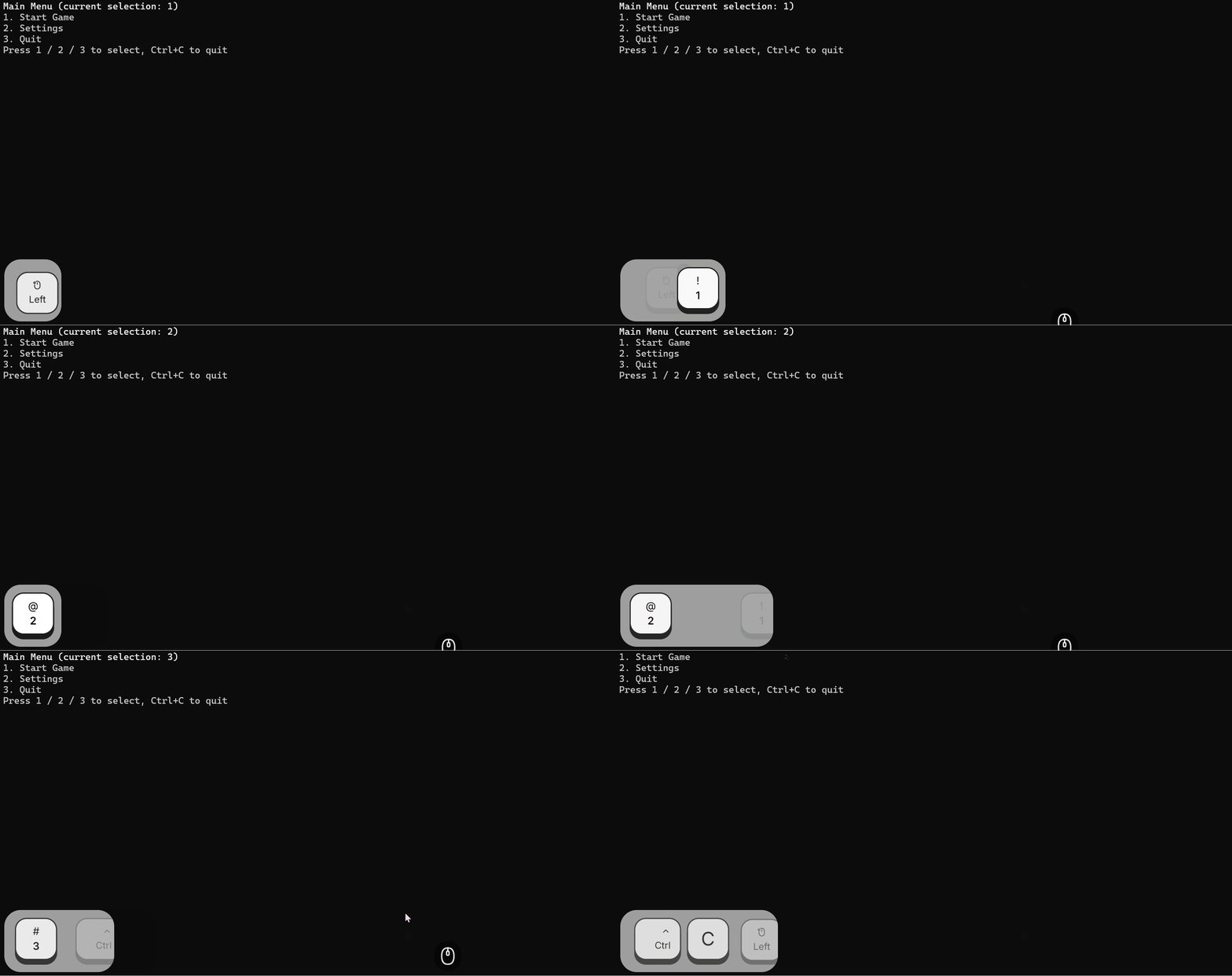
A runnable app consists of three parts: registering the screen (registerComponent), provider nesting (ScenarioManagementProvider > KeyboardProvider > CurrentScreen), and the render entry (render).
Usage notes for the binding itself:
- Bindings must be registered inside
useEffect, never directly in the component function body; - The dependency array is usually
[boundKeyboard]— theboundKeyboardreference in the object returned byuseKeyboardis stable; - Return the unbind function (
return () => { ... }) — this is the recommended cleanup practice, for the reasons explained in "Unbinding and Cleanup" below.
Unbinding and cleanup
The unbind function returned by boundKeyboard removes the binding. It is recommended to return it from useEffect, letting React clean up automatically when the component unmounts or when the effect re-runs due to dependency changes:
useEffect(() => {
    return boundKeyboard('s', () => doSomething());
}, [boundKeyboard]);
Effects of this pattern:
- When the component unmounts (e.g. navigating away from the current screen), the binding is removed automatically;
- When the effect re-runs due to dependency changes, the old binding is cleaned up first, then the new one is registered — no accumulation.
Note: when the callback depends on component state, include that state in the dependency array, otherwise the closure will capture stale values.
Common options
The third argument of boundKeyboard is optional configuration. This chapter covers the three most common options; the rest (when, focusId, elementId, observer, etc.) are covered in later chapters.
mode: restrict to a mode
// Only active in insert mode (the mode must be registered in advance, see the modes option of KeyboardProvider)
boundKeyboard('s', () => save(), { mode: 'insert' })once: auto-unbind after the first trigger
// Fires once on any key, then the binding is removed automatically
boundKeyboard('*', () => start(), { once: true })times: fire after N presses
// Fires after 3 consecutive presses (then every 3rd: 3rd, 6th, 9th…)
boundKeyboard('x', () => confirm(), { times: 3 })
Keyboard event propagation
When a key is pressed, the event passes through the various stages of the keyboard engine (modal layers, global keys, layers, etc.) and finally reaches the screen stack stage. The screen stack behaves as follows:
- The event only enters the screen stack stage if none of the earlier stages consumed it;
- The screen stack tries the bindings of each screen from the top screen (the current screen) down to the bottom screen (the root screen);
- Once a screen's binding matches and consumes the event, propagation stops immediately;
- If no screen has a matching binding, the event is ignored.
In other words: keys not handled by the current screen are, by default, propagated down to screens further down the stack — this is the engine's default behavior.
But this behavior has a critical prerequisite: the bindings of the lower screens must still exist. If you register bindings in useEffect without returning the unbind functions, the bindings remain in the engine after the component unmounts (e.g. navigating away). From then on, key presses still hit those leftover bindings and trigger logic of screens you have left — producing "ghost keys".
Therefore, the recommended practice is: always return the unbind function from useEffect, so bindings are removed when the component unmounts. Event propagation is pass-through by default, but always clean up properly.
Caveats
- Bindings must be registered inside
useEffectwith the unbind function returned, to avoid "ghost keys" caused by leftover bindings (see "Keyboard Event Propagation" above). - The wildcard
'*'matches any key and is often combined withonce: truefor "press any key to continue" scenarios. boundKeyboardcan only be used inside a component — it obtains its context throughuseKeyboard, and the component must be inside aKeyboardProvider.